AR Code Object Capture 3D Scan4.1.8
Publisher Description


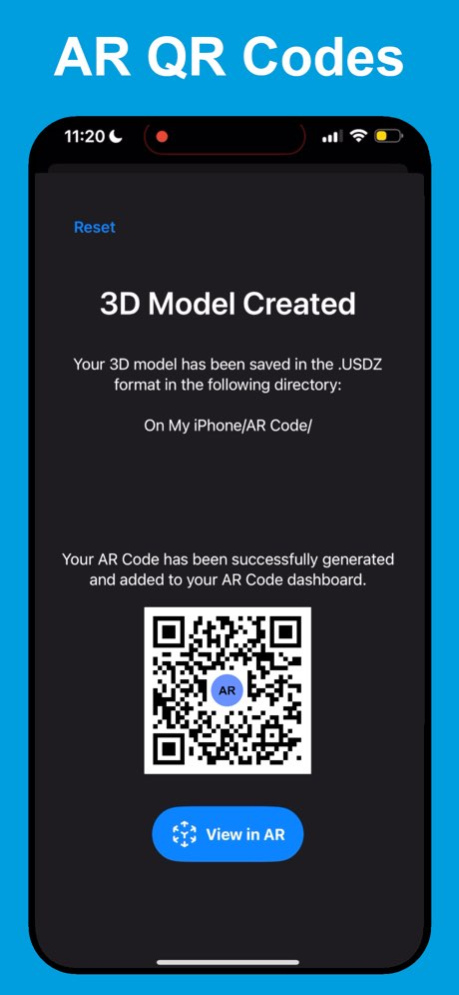
AR Code Object Capture is a pro-grade 3D capture tool and AR QR Code generator for iPhone, iPad, and Macs with Apple silicon.
Key features:
. Fast, precise 3D scans with a simple guided flow.
. Uses LiDAR when available; otherwise processes via cloud photogrammetry for high-detail models.
. Gaussian Splatting "AR Splat" for photorealistic 3D scans, including transparent/reflective materials.
. One-tap AR QR codes from your 3D models; viewers need no extra app.
. Customizable AR Code designs-both functional and brandable.
. Customizable in-AR banner to engage users during the experience.
Capture objects, create immersive AR experiences, and share instantly with an AR Code.
AR Code Object Capture Premium is a monthly recurring subscription. You will automatically be billed the amount (US$34.99) through the App Store at the end of the free trial period which is 7 days. The monthly subscription automatically renews unless it is canceled at least 24 hours before the end of the current period. Your account will be charged for renewal within 24 hours prior to the end of the current period. Any unused portion of the free trial period will be forfeited. You can manage your subscription in the App Store.
Terms of use: https://ar-code.com/page/terms
Privacy policy: https://ar-code.com/page/privacy
Version History - Fixed LiDAR-enabled capture on iOS 26.6
- Improved app stability and performance 4.1.8 Aug 3 - Bug fixes 4.1.7 Mar 20 - bug fixes 4.1.6 Feb 28 - Improvements for speed and reliability 4.1.4 Feb 7 • Gaussian Splatting: Photorealistic 3D scans, including transparent and reflective materials.
• Multilingual: Available in 32 languages.
• Minor bug fixes 4.1.3 11/10/2025 • Gaussian Splatting: Photorealistic 3D scans, including transparent and reflective materials.
• Multilingual: Available in 32 languages.
• Minor bug fixes 4.1.2 11/09/2025 • Gaussian Splatting: Photorealistic 3D scans, including transparent and reflective materials.
• Multilingual: Available in 32 languages. 4.1.0 11/06/2025 - Improvements for speed and reliability 4.0.9 08/27/2025 - No LiDAR Mode: Create 3D models and generate AR Codes on iPhones and iPads that don't have a LiDAR sensor.
- Customizable Banners: Boost user engagement with personalized banners for your AR Code experiences.
- AR Scaling: Adjust and scale 3D models after generating an AR Code. 4.0.8 05/14/2025 - Improvements for speed and reliability 4.0.6 12/23/2024 - Personalize your AR Codes' designs 4.0.5 12/13/2024 - Fixed a bug in 3D reconstruction 4.0.4 12/12/2024 - Improvements for speed and reliability 4.0.3 12/10/2024 - Improvements for speed and reliability 4.0.1 10/26/2024 - Improved reliability and stability in the 3D modeling process 4.0.0 08/13/2024 - In this version, our Premium subscription unlocks your potential with professional 3D scans: Enjoy unlimited 3D scans, no time limits on AR QR Codes availability, and 1,000 scans per month per code. The subscription also includes a commercial license for business use and an ad-free experience.
- Additionally, we've improved 3D rendering, speed, and reliability for a smoother user experience. 3.9.7 08/08/2024 - Improvements for speed and reliability 3.9.6 06/26/2024 - Improvements for speed and reliability 3.9.5 02/28/2024 - Improved stability and performance 3.9.2 10/05/2023 - Improved stability and performance 3.9.0 09/28/2023 - Improved stability and performance 3.8.9 09/27/2023 - Demo AR Codes are automatically saved with your 3D file
- Improvements for speed and reliability 3.8.8 09/25/2023 - Simplified 3D scan with Object Capture
- Instant 3D modeling
- AR QR Code Generation 3.8.7 09/21/2023 - Improvements for speed and reliability 3.5 04/01/2023 - iOS 16
- Improvements for speed and reliability 3.4 11/05/2022
About AR Code Object Capture 3D Scan
The company that develops AR Code Object Capture 3D Scan is AR Code Pte. Ltd.. The latest version released by its developer is 4.1.8. This app was rated by 1 users of our site and has an average rating of 0.5.
To install AR Code Object Capture 3D Scan on your iOS device, just click the green Continue To App button above to start the installation process. The app is listed on our website since 2026-10-14 and was downloaded 1,801 times. We have already checked if the download link is safe, however for your own protection we recommend that you scan the downloaded app with your antivirus. Your antivirus may detect the AR Code Object Capture 3D Scan as malware if the download link is broken.
How to install AR Code Object Capture 3D Scan on your iOS device:
- Click on the Continue To App button on our website. This will redirect you to the App Store.
- Once the AR Code Object Capture 3D Scan is shown in the iTunes listing of your iOS device, you can start its download and installation. Tap on the GET button to the right of the app to start downloading it.
- If you are not logged-in the iOS appstore app, you'll be prompted for your your Apple ID and/or password.
- After AR Code Object Capture 3D Scan is downloaded, you'll see an INSTALL button to the right. Tap on it to start the actual installation of the iOS app.
- Once installation is finished you can tap on the OPEN button to start it. Its icon will also be added to your device home screen.
Program Details
System requirements
Download information
Pricing
Version History
version 4.1.8
posted on 2026-10-14
Version History - Fixed LiDAR-enabled capture on iOS 26.6
- Improved app stability and performance 4.1.8 Aug 3 - Bug fixes 4.1.7 Mar 20 - bug fixes 4.1.6 Feb 28 - Improvements for speed and reliability 4.1.4 Feb 7 • Gaussian Splatting: Photorealistic 3D scans, including transparent and reflective materials.
• Multilingual: Available in 32 languages.
• Minor bug fixes 4.1.3 11/10/2025 • Gaussian Splatting: Photorealistic 3D scans, including transparent and reflective materials.
• Multilingual: Available in 32 languages.
• Minor bug fixes 4.1.2 11/09/2025 • Gaussian Splatting: Photorealistic 3D scans, including transparent and reflective materials.
• Multilingual: Available in 32 languages. 4.1.0 11/06/2025 - Improvements for speed and reliability 4.0.9 08/27/2025 - No LiDAR Mode: Create 3D models and generate AR Codes on iPhones and iPads that don't have a LiDAR sensor.
- Customizable Banners: Boost user engagement with personalized banners for your AR Code experiences.
- AR Scaling: Adjust and scale 3D models after generating an AR Code. 4.0.8 05/14/2025 - Improvements for speed and reliability 4.0.6 12/23/2024 - Personalize your AR Codes' designs 4.0.5 12/13/2024 - Fixed a bug in 3D reconstruction 4.0.4 12/12/2024 - Improvements for speed and reliability 4.0.3 12/10/2024 - Improvements for speed and reliability 4.0.1 10/26/2024 - Improved reliability and stability in the 3D modeling process 4.0.0 08/13/2024 - In this version, our Premium subscription unlocks your potential with professional 3D scans: Enjoy unlimited 3D scans, no time limits on AR QR Codes availability, and 1,000 scans per month per code. The subscription also includes a commercial license for business use and an ad-free experience.
- Additionally, we've improved 3D rendering, speed, and reliability for a smoother user experience. 3.9.7 08/08/2024 - Improvements for speed and reliability 3.9.6 06/26/2024 - Improvements for speed and reliability 3.9.5 02/28/2024 - Improved stability and performance 3.9.2 10/05/2023 - Improved stability and performance 3.9.0 09/28/2023 - Improved stability and performance 3.8.9 09/27/2023 - Demo AR Codes are automatically saved with your 3D file
- Improvements for speed and reliability 3.8.8 09/25/2023 - Simplified 3D scan with Object Capture
- Instant 3D modeling
- AR QR Code Generation 3.8.7 09/21/2023 - Improvements for speed and reliability 3.5 04/01/2023 - iOS 16
- Improvements for speed and reliability 3.4 11/05/2022
version 4.1.8
posted on 2026-08-07
Version History - Fixed LiDAR-enabled capture on iOS 26.6
- Improved app stability and performance 4.1.8 3d ago - Bug fixes 4.1.7 Mar 20 - bug fixes 4.1.6 Feb 28 - Improvements for speed and reliability 4.1.4 Feb 7 • Gaussian Splatting: Photorealistic 3D scans, including transparent and reflective materials.
• Multilingual: Available in 32 languages.
• Minor bug fixes 4.1.3 11/10/2025 • Gaussian Splatting: Photorealistic 3D scans, including transparent and reflective materials.
• Multilingual: Available in 32 languages.
• Minor bug fixes 4.1.2 11/09/2025 • Gaussian Splatting: Photorealistic 3D scans, including transparent and reflective materials.
• Multilingual: Available in 32 languages. 4.1.0 11/06/2025 - Improvements for speed and reliability 4.0.9 08/27/2025 - No LiDAR Mode: Create 3D models and generate AR Codes on iPhones and iPads that don't have a LiDAR sensor.
- Customizable Banners: Boost user engagement with personalized banners for your AR Code experiences.
- AR Scaling: Adjust and scale 3D models after generating an AR Code. 4.0.8 05/14/2025 - Improvements for speed and reliability 4.0.6 12/23/2024 - Personalize your AR Codes' designs 4.0.5 12/13/2024 - Fixed a bug in 3D reconstruction 4.0.4 12/12/2024 - Improvements for speed and reliability 4.0.3 12/10/2024 - Improvements for speed and reliability 4.0.1 10/26/2024 - Improved reliability and stability in the 3D modeling process 4.0.0 08/13/2024 - In this version, our Premium subscription unlocks your potential with professional 3D scans: Enjoy unlimited 3D scans, no time limits on AR QR Codes availability, and 1,000 scans per month per code. The subscription also includes a commercial license for business use and an ad-free experience.
- Additionally, we've improved 3D rendering, speed, and reliability for a smoother user experience. 3.9.7 08/08/2024 - Improvements for speed and reliability 3.9.6 06/26/2024 - Improvements for speed and reliability 3.9.5 02/28/2024 - Improved stability and performance 3.9.2 10/05/2023 - Improved stability and performance 3.9.0 09/28/2023 - Improved stability and performance 3.8.9 09/27/2023 - Demo AR Codes are automatically saved with your 3D file
- Improvements for speed and reliability 3.8.8 09/25/2023 - Simplified 3D scan with Object Capture
- Instant 3D modeling
- AR QR Code Generation 3.8.7 09/21/2023 - Improvements for speed and reliability 3.5 04/01/2023 - iOS 16
- Improvements for speed and reliability 3.4 11/05/2022
version 4.1.7
posted on 2026-07-23
Version History - Bug fixes 4.1.7 Mar 20 - bug fixes 4.1.6 Feb 28 - Improvements for speed and reliability 4.1.4 Feb 7 • Gaussian Splatting: Photorealistic 3D scans, including transparent and reflective materials.
• Multilingual: Available in 32 languages.
• Minor bug fixes 4.1.3 11/10/2025 • Gaussian Splatting: Photorealistic 3D scans, including transparent and reflective materials.
• Multilingual: Available in 32 languages.
• Minor bug fixes 4.1.2 11/09/2025 • Gaussian Splatting: Photorealistic 3D scans, including transparent and reflective materials.
• Multilingual: Available in 32 languages. 4.1.0 11/06/2025 - Improvements for speed and reliability 4.0.9 08/27/2025 - No LiDAR Mode: Create 3D models and generate AR Codes on iPhones and iPads that don't have a LiDAR sensor.
- Customizable Banners: Boost user engagement with personalized banners for your AR Code experiences.
- AR Scaling: Adjust and scale 3D models after generating an AR Code. 4.0.8 05/14/2025 - Improvements for speed and reliability 4.0.6 12/23/2024 - Personalize your AR Codes' designs 4.0.5 12/13/2024 - Fixed a bug in 3D reconstruction 4.0.4 12/12/2024 - Improvements for speed and reliability 4.0.3 12/10/2024 - Improvements for speed and reliability 4.0.1 10/26/2024 - Improved reliability and stability in the 3D modeling process 4.0.0 08/13/2024 - In this version, our Premium subscription unlocks your potential with professional 3D scans: Enjoy unlimited 3D scans, no time limits on AR QR Codes availability, and 1,000 scans per month per code. The subscription also includes a commercial license for business use and an ad-free experience.
- Additionally, we've improved 3D rendering, speed, and reliability for a smoother user experience. 3.9.7 08/08/2024 - Improvements for speed and reliability 3.9.6 06/26/2024 - Improvements for speed and reliability 3.9.5 02/28/2024 - Improved stability and performance 3.9.2 10/05/2023 - Improved stability and performance 3.9.0 09/28/2023 - Improved stability and performance 3.8.9 09/27/2023 - Demo AR Codes are automatically saved with your 3D file
- Improvements for speed and reliability 3.8.8 09/25/2023 - Simplified 3D scan with Object Capture
- Instant 3D modeling
- AR QR Code Generation 3.8.7 09/21/2023 - Improvements for speed and reliability 3.5 04/01/2023 - iOS 16
- Improvements for speed and reliability 3.4 11/05/2022 - Design
- Improvements for speed and reliability 3.1 11/28/2021
version 4.1.6
posted on 2026-02-28
- bug fixes
version 4.1.4
posted on 2026-02-07
- Improvements for speed and reliability
version 4.1.3
posted on 2025-11-10
• Gaussian Splatting: Photorealistic 3D scans, including transparent and reflective materials.
• Multilingual: Available in 32 languages.
• Minor bug fixes
version 1.1.1
posted on 2025-08-26
Aug 26, 2025
Version 1.1.1
- Improvements for speed and reliability
version 1.1.0
posted on 2025-05-30
May 30, 2025
Version 1.1.0
- Scale 3D models automatically upon AR Code generation
- Customize AR Code design to match your brand or style
- Unlock banner customization with a Premium account (for subscribers and API key holders)
version 1.0.7
posted on 2025-01-02
Jan 2, 2025
Version 1.0.7
- Improvements for speed and reliability
version 4.0.0
posted on 2024-08-13
Aug 13, 2024
Version 4.0.0
- Improved reliability and stability in the 3D modeling process
